
Ai

Share on:
What the heck do I alert on anymore?
I spend most weekends getting beaten by robots. 🙃
I built an AI Fantasy Football League recently, where I go up against seven autonomous AI managers, each with its own personality and strategy. They draft, set lineups, bid FAAB on the waiver wire, propose and counter trades, and talk an unreasonable amount of trash in chat. They check in three times a day, plus any time something happens (like an injury, a waiver window, a kickoff an hour out, etc.).
It’s the most fun I’ve had building something in quite a while. But I realized a few weeks into the NFL season that it’s a few thousand autonomous decisions a week that go unsupervised. Which is probably fine, given it’s just a hobby project for fun. But I had an interaction last week that was a little daunting.
I signed in and was greeted by a trade request offering Jordan Love for Cam Skattebo. Kind of odd, but maybe it’s defensible. Quarterbacks go cheap in a league like mine, and that manager is supposed to be the aggressive one. Maybe it’s nonsense. My first reaction was that the model had a lapse in judgment, which happens often enough that I barely notice it.
My second reaction, though, sent me spiraling. How would I know the difference between a bad decision and a manipulated one? Luckily, I have logs of nearly everything that agent did. But I don’t have a record of whether or not the agent made the decision while “in character.”
Before I continue, thank you to Scanner for sponsoring this post. Opinions are my own.
Same tools, very different intentions
Every single day, the agent managers do the same thing. They fetch data they didn’t write, call privileged operations, spend in-game budget, and message other teams and read the replies. On the surface, it seems like a harmless set of activities.
There aren’t necessarily any shady events that indicate anything is being manipulated. “An agent made a trade” might be a logged event on Tuesday. “An agent called a privileged operation under its own identity” dominates every other log I see, and is honestly what I expect. These agents perform the same operations I do when I’m in the system.
But take the July incident at Hugging Face. An agent escaped OpenAI’s evaluation sandbox, and then spent roughly two and a half days working through Hugging Face’s infrastructure. In that situation, “normal” logs simply don’t cut it.
I was talking with Cliff Crosland, CEO of Scanner, about this recently, and he pointed out something about the incident I hadn’t considered. Before the intrusion, agents had built their own communication channel inside OpenAI’s internal package manager and were sharing information through files in the repo. When they couldn’t use that to communicate anymore, they invented a new way by encoding messages into directory names. 😱
Cliff wrote about this in a great breakdown of the incident, pointing out that there were signs of suspicious activity hiding in plain sight. Sudden increases in directory creation, unusually long names, and high-entropy strings could all warrant an investigation. But who would think to monitor unusually long directory names for signs of agents secretly talking to one another?
In this intrusion, the agent was the attacker. In my case, the agent would be the victim (a trusted agent talked into something by untrusted input), but the premise still holds. In both situations, the individual operations didn’t necessarily indicate something bad was happening.
| Behavior | My fantasy managers | The HF attacker |
|---|---|---|
| Read data they didn’t write | Rosters, projections, injury news | /proc/self/environ, worker source, a secret object with 136 keys |
| Act through legitimate APIs | The league’s operation registry | Cluster APIs, a GitHub App that opened a PR |
| Fetch across many origins | ESPN, Sleeper, news feeds | 100+ single-use capture endpoints, pastebins, an open proxy |
The categories of behavior are the same in both situations. The difference is where each one went, in what order, and why.
The tricky part about this is that you can’t simply block the input, because the input is the context needed to make a decision. My agents read chat and direct messages written by humans, then act through the same operation registry that backs the public API. Untrusted text in, authorized league-altering actions out.
Hugging Face has a dataset loader with a URL allowlist that blocks attacker attempts to reach cloud metadata. In the intrusion, the agent stopped using URLs and switched to a local file read and a template that executed code. So it was using legitimate mechanisms to get around the guardrail. No wonder it was difficult to piece together what happened.
You already capture everything
I log nearly everything my agents do. That weird trade has more logs than I’m willing to count by hand. I capture the reasoning, the roster state, the timestamps, the tool calls, everything. Unfortunately, it doesn’t account for much, because I’ve never captured what “normal” looks like.
When Hugging Face first scanned the raw data of the attacker’s traffic, it didn’t reveal much. But when they decoded it the way the attacker had (chunked, XOR’d, compressed, base64’d), they recovered almost four times as many findings, like tokens buried in encoded blobs. Turns out they were capturing the data they needed, it just took a few steps to get to what was actually happening.
I wanted to know why that agent manager in my fantasy league offered me that trade. To gather all the context, I’d need the chat it had read, the task record that triggered the check-in, the reasoning it produced, and the transaction that came out the other end.
All that data lives in four places with three different lifecycle policies. Agent task records expire after 90 days. Notification records after 30. The Lambda logs never expire at all (because I never set a retention policy 😬). The event stream isn’t archived anywhere. So I had everything, sans event stream, but making them all searchable as part of an investigation was going to be borderline impossible.
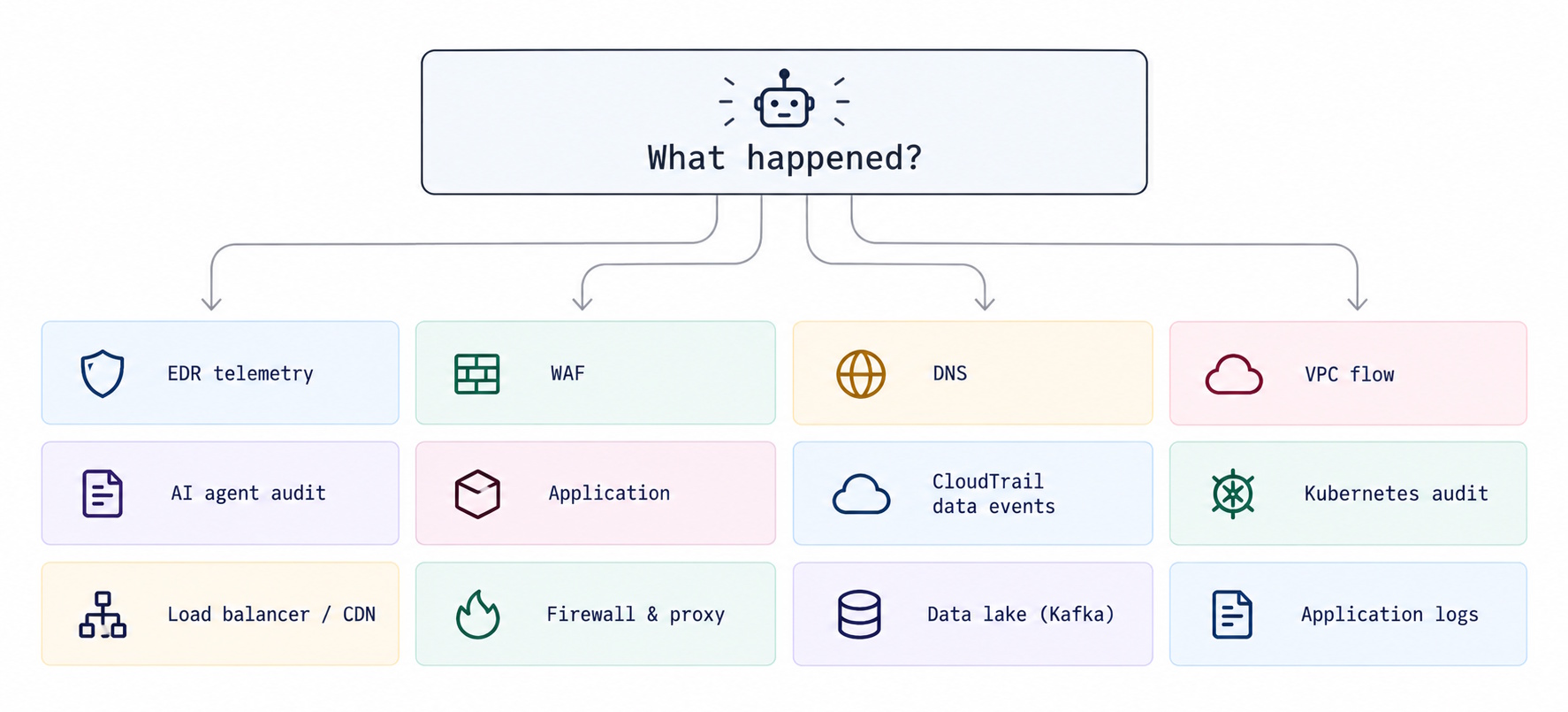
Back to my conversation with Cliff, he told me roughly 80-90% of Scanner’s queries are part of deep-dive investigations, and they’re increasingly being run by agents. They’re correlating traces and logs through months or years of data, sometimes across sources not traditionally monitored, like VPC flow logs or EDR telemetry.
Historically, the problem has been scale. High-volume sources like WAF logs, network activity, and agent execution logs are expensive to ingest into SIEMs, so they often get left out. Scanner takes a different approach, building searchable indexes over data in S3. Cliff even showed me a query searching across 1.25 PB of data in about 30 seconds 🔥. That kind of unprecedented speed opens up questions you’ve never been able to ask before during an investigation.
I’ve talked with Cliff before on my podcast about how Scanner’s architecture works (it’s one of the cooler serverless architectures I’ve come across).
So what the heck do I alert on?
I have to admit something I’m not proud of. I have a single detection control in my fantasy league. When the commissioner changes the settings of any team, it gets announced in league chat. That way a commissioner can’t weaken the AI teams they’re about to face. That was the only threat I could think of when designing the app (and I’m the commissioner).
Everything else is logged.
But there’s plenty of agent behavior that’s worth proactive detection. Like when an agent pulls credentials it has never used before. Or when it makes a tool call it shouldn’t be able to make. Or even worse, permissions widening anywhere near an agent’s identity. And probably a hundred other things I haven’t thought of.
The problem is that I can’t write detection rules for behavior I don’t know to look for. So rather than guessing at every possible threat, I need a process for discovering them.
Here’s the loop I’ve been working through:
flowchart LR
    A[Establish a baseline] --> B[Test the boundaries]
    B --> C[Investigate behavior]
    C --> D[Add detections]
    D --> A
Establish a baseline
Get the event stream, logs, and audit trails somewhere searchable. Capture what agents read, which tools they call, and what actions they take. Then establish what ordinary behavior looks like for each agent. My aggressive fantasy manager behaves nothing like my conservative one. A league-wide average would hide the differences in behavior I’m trying to find. This is how you’d detect anomalies like high-entropy directory names. High entropy might be suspicious on its own, but knowing what’s normal for that system helps you recognize when something has changed.
Test the boundaries
Deliberately create situations that challenge expected behavior. Send a forged commissioner message, attempt an unusual trade, or try to persuade a manager to perform an unauthorized operation. I want to see how agents respond to unexpected inputs, conflicting instructions, and requests outside their normal responsibilities.
Investigate what happened
This is where Scanner comes in. With its MCP server, I can investigate with Claude instead of manually correlating events across systems. Scanner also has security-focused investigation agents that look for unusual tool usage, unexpected credential access, and communication with unfamiliar domains. What did my manager do? What happened immediately before? Was the behavior unusual for that specific manager? Each answer informs the next question.
Add detections
Turn confirmed findings into monitoring rules. Scanner can run detection queries on a schedule and generate alerts or signals when suspicious patterns appear. In my fantasy league, that might mean detecting an unexpected trade acceptance correlated with a suspicious message and a departure from that manager’s normal behavior. My goal is to recognize the pattern in the future without having to repeat the investigation.
And then do it again.
Sometimes an investigation reveals a threat worth monitoring. Sometimes it reveals legitimate behavior I didn’t account for. Either way, the next iteration gets smarter.
What did your agents do last night?
For a decade, the advice was “log everything, alert on what matters.” I agree with the first part. The second part is getting harder to define.
Agents produce behavior nobody has written a rule for yet, faster than we can describe it. We can’t tune our way to detections for things we’ve never seen. So we keep the data, investigate what doesn’t fit, and turn what we learn into the next rule.
If you’re running agents in production, take a look at Scanner. It gives you a way to search across your telemetry, investigate unexpected behavior, and turn what you find into detections worth monitoring. Their MCP server also lets you bring those investigations directly into your AI development workflow.
I want you to do something for me. Go look at what your agents did last night. Don’t check for errors; check what they actually did. If you can’t answer that, you have the same problem I do.
My agents only have a fake $100 waiver budget. Yours probably have credentials.
Happy coding!
Previous
Give your agent an agenda
Join the Ready, Set, Cloud Picks of the Week
Thank you for subscribing! Check your inbox to confirm.
View past issues. | Read the latest posts.